
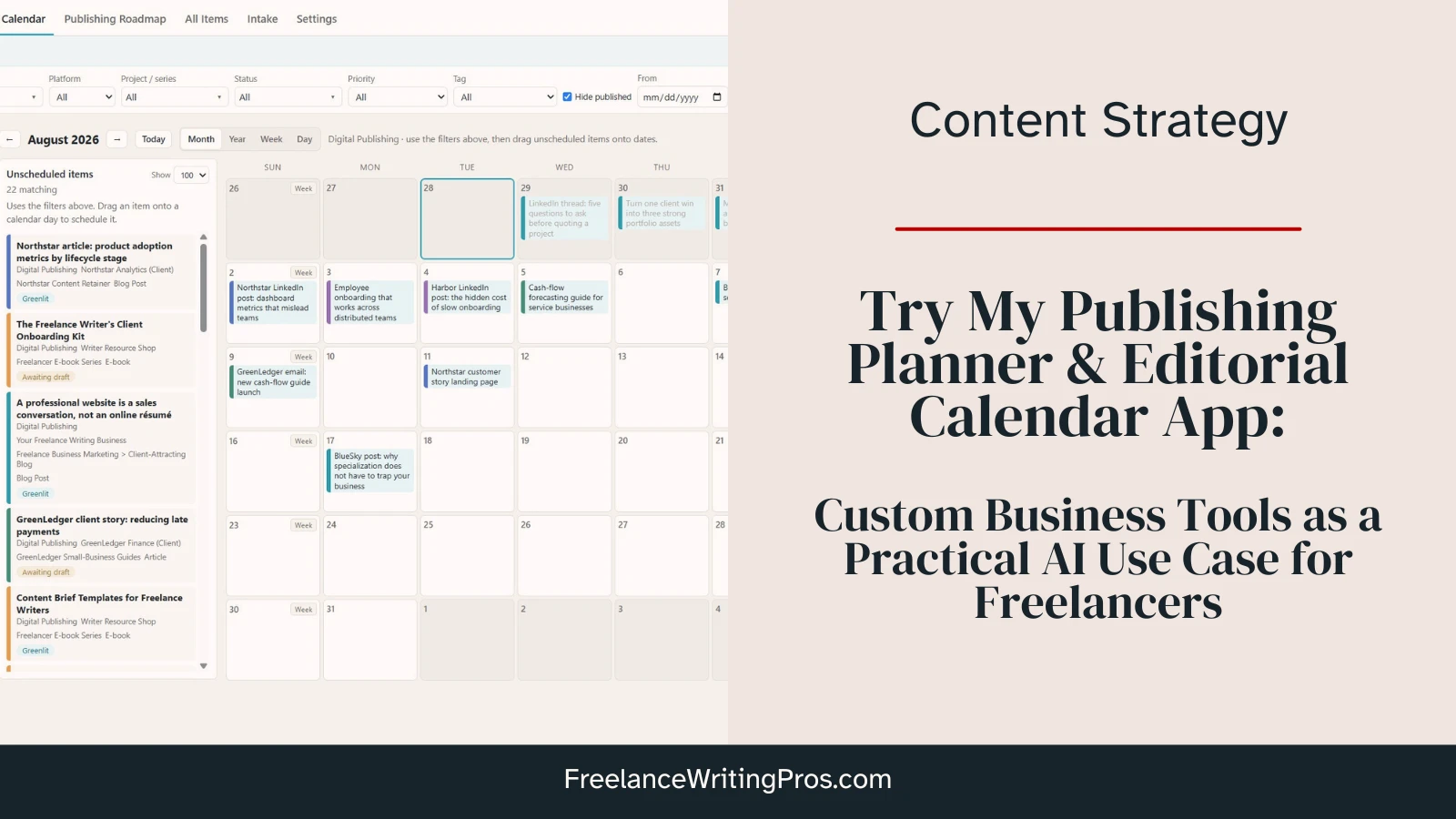
When it comes to writers and AI tools, conversations tend to be limited (and often dated), focused almost entirely around AI content generation. But that’s not where the real benefits lie for freelancers. It’s not about churning out more content more quickly to appeal to cheapskate clients.
The real business benefits fall more on the agentic and technical side, like building custom business tools that solve real problems specific to your freelance writing business.
I’ve built out quite a few so far, some still being tested, modified, and replaced when I come up with better approaches. But a good example is my local Publishing Planner and Editorial Calendar browser app, built by Codex using GPT 5.5 and 5.6.
I’m going to share that tool with you today as an example of things you can do with AI tools that have nothing to do with replacing your own writing. Explore the screenshots below, and towards the end of this post you can download a version to test yourself (or even have your AI tool of choice customize it for your own needs).
Why I Needed a Custom Publishing Planner
My business doesn’t always look like most writers’ businesses. I don’t focus exclusively on freelancing, digital publishing, or book publishing. My business is a mix of all three.
That can complicate things when using more traditional editorial calendars.
I wanted a tool that could help me manage blog content, newsletters, social media content, digital products like e-books and course content, book publishing projects, and shorter pieces like short stories, flash fiction, and poetry.
And I wanted one tool that could do it all without making a mess of it.
What My Publishing Planner Needed to Do
Here are all the things I wanted this tool to handle for me:
- Content idea tracking
- Production statuses (idea / awaiting draft / awaiting edits / etc)
- Separation of multiple “properties” (for me, meaning websites I own, individual clients, or imprints)
- The ability to add and manage parent and child “projects” (think book series, or a newsletter falling under a certain property)
- A long-term book publishing project roadmap
- A monthly / weekly / daily editorial calendar for blog posts, newsletters, and social media content
I wanted one system, and a simple one at that.
That’s what Codex built for me, and after several rounds of testing, making improvements, and having a human code review by a professional software engineer, it’s fully functional and being used in my day-to-day work. And I love it.
I get the design might not be everyone’s style. It was set up with my 32-in main monitor in mind, where I do most of this kind of work. So on smaller screens, the filter bar might split to two lines. It was set up with Chrome in mind, though it should work fine in other browsers. And you can absolutely have Codex or a tool like Claude Code or Claude Cowork review this if you download it, and have it tweaked to fit your own setup better.
The Publishing Planner / Editorial Calendar Preview
Before I get into how this was built and some other project examples to hopefully pique your curiosity more, I want to give you a preview of this app.
Note: I did upload larger images here than I would normally recommend, and that’s so you can open the images in a new tab or click them (potentially twice) to see them full-sized so you can actually read the text and fully see the settings.
The Main Dashboard
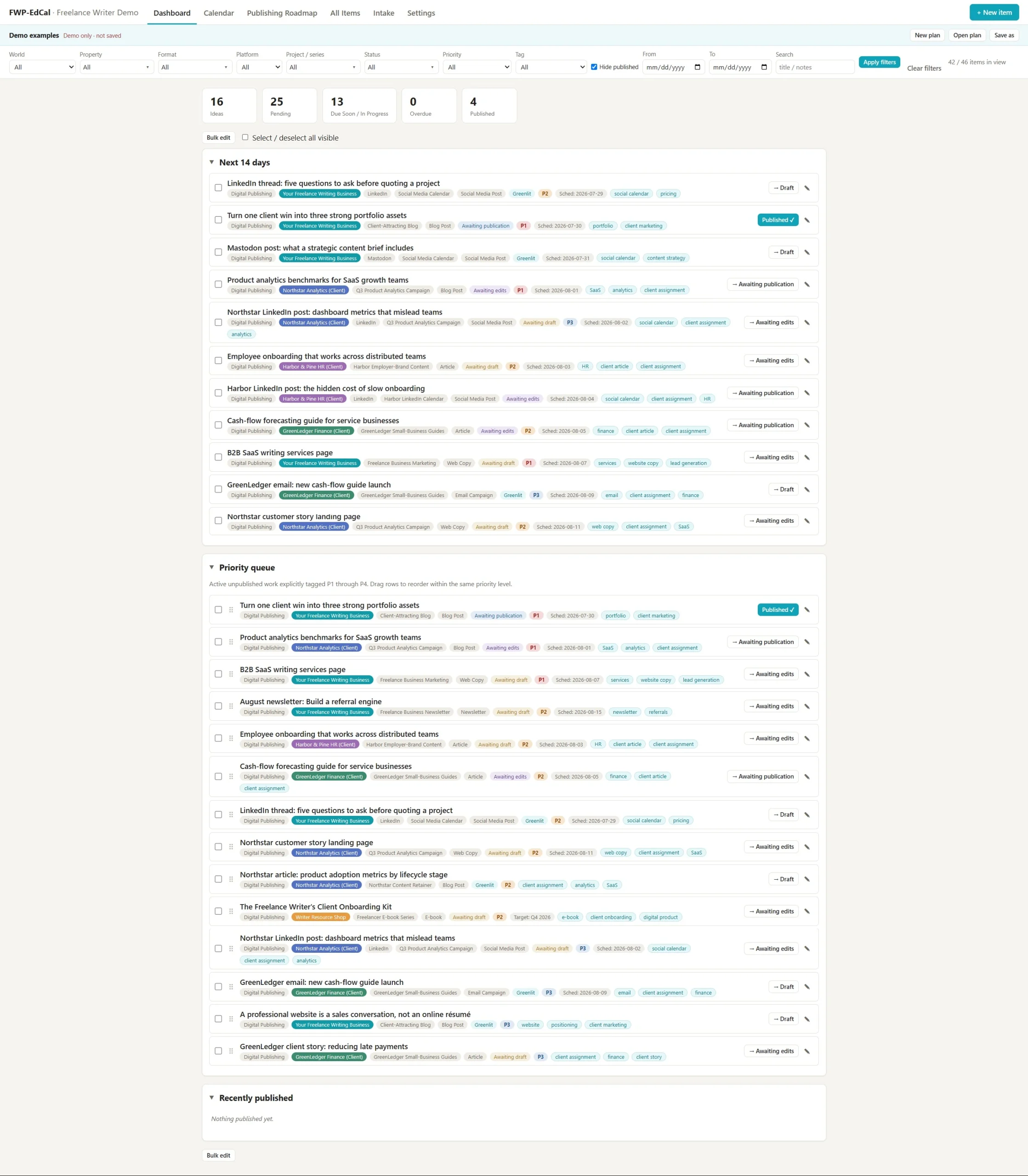
This is what the starting screen looks like. It features sections for what’s coming in the next 14 days, a list of projects that you added priority tags to, and then recently-published work. It’s a snapshot in time.
The Editorial Calendar
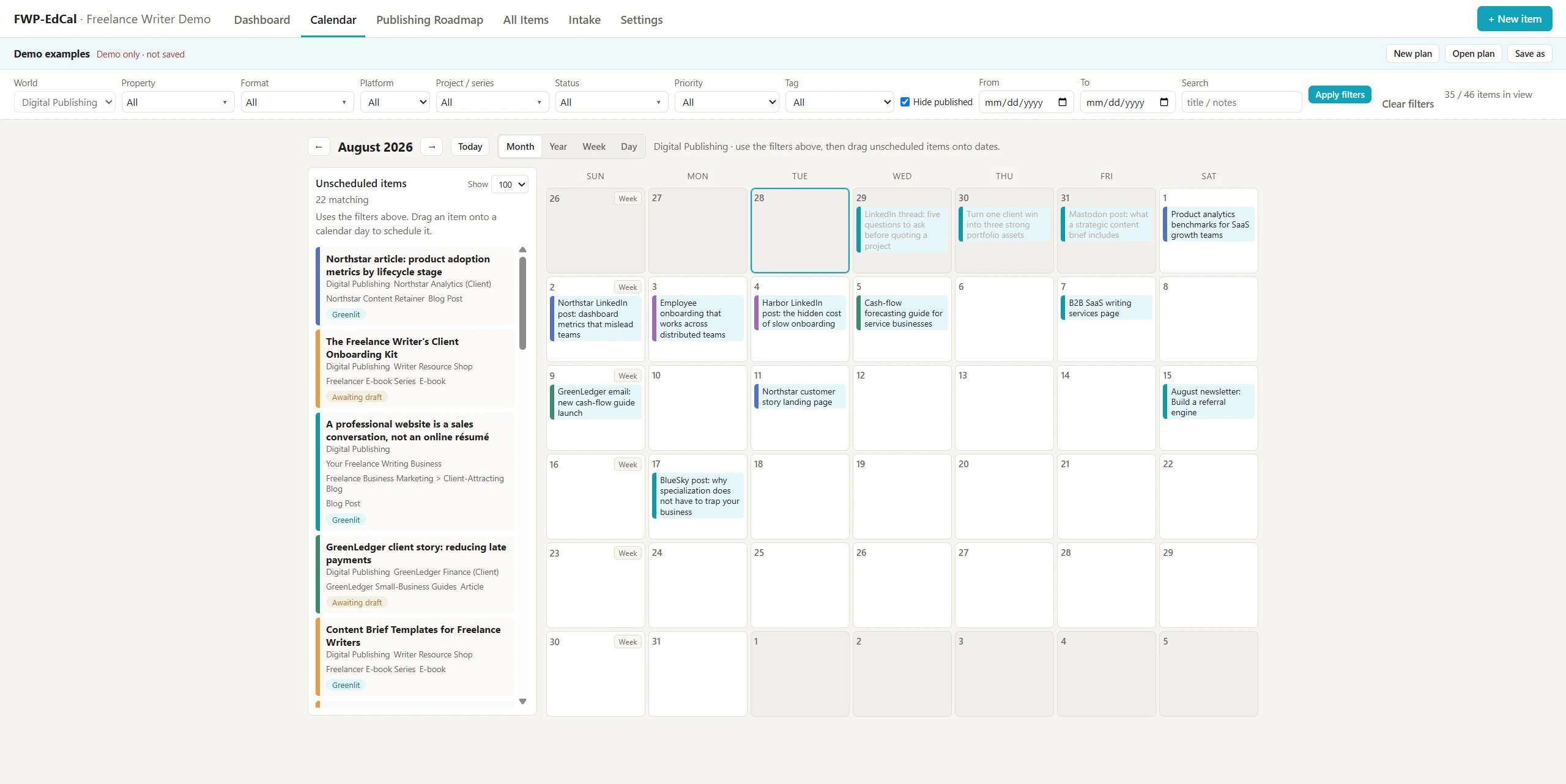
This is the monthly view for the editorial calendar. There are also weekly and daily views built in.
This is the area where blog posts, newsletters, and social media content are scheduled. You can drag-and-drop content to schedule it or move it around. You can drag unscheduled items from the left onto the calendar. It’s been very intuitive to use.
This is a good time to note every single page in this browser app can be filtered using the settings at the top. So, for example, you don’t need to create a new planner file for every website or client. You can isolate them onto their own calendar views using the filters, and maintain just one actual planner file where you can view everything at once, single properties or projects, or a mix.
The Publishing Roadmap
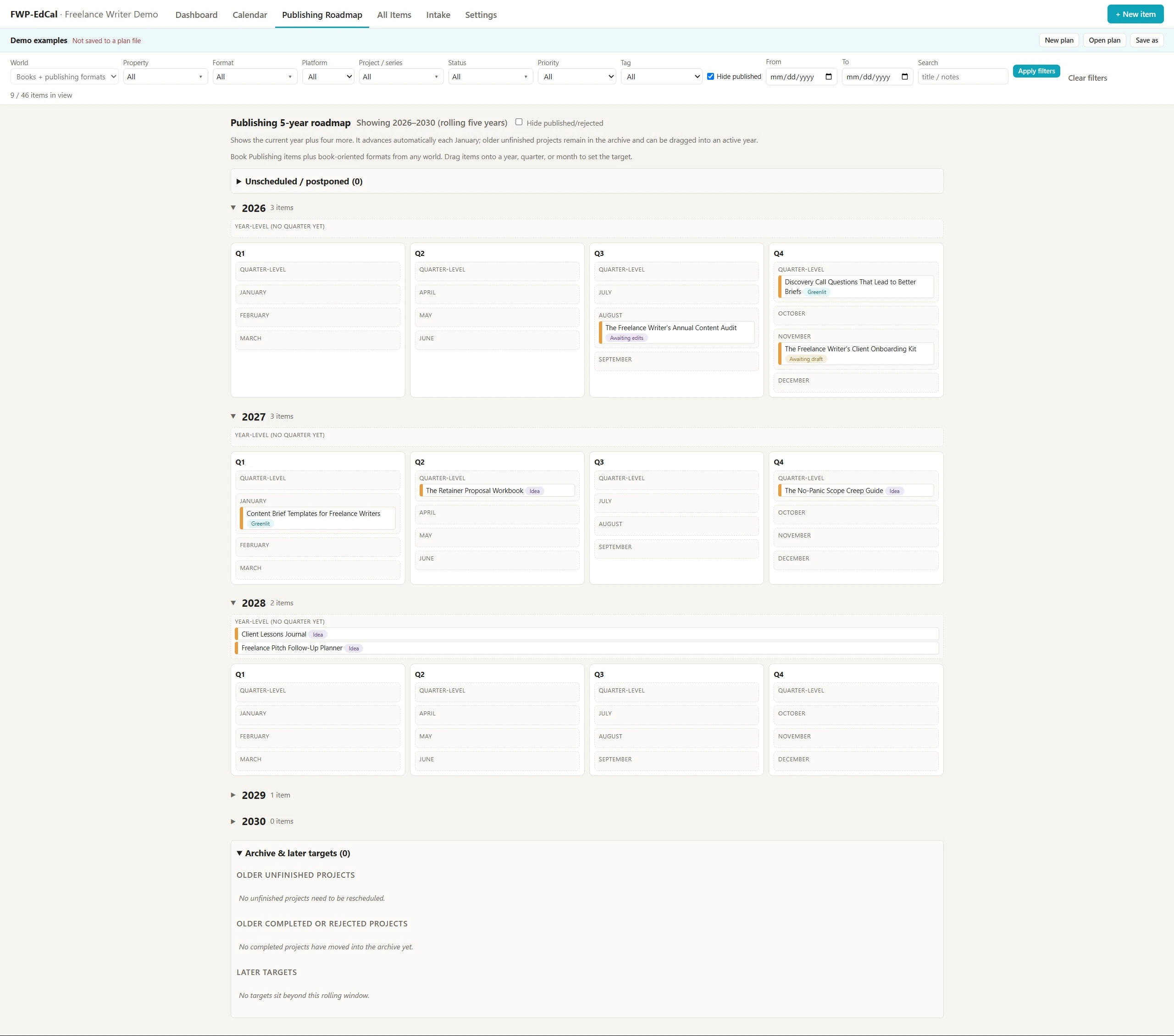
The roadmap view is where I moved my former Word-based 5-year publishing plan. It’s a long-term view for book, e-books, and other work that falls outside freelancing and my digital publishing projects.
If you’re planning far out, such as for a book series, you can drop a planned title into the yearly scheduling slot, a quarterly one, or a specific month. And once in this view, you can drag-and-drop to move them around as plans get refined or adjusted.
Note: This is not where I do more detailed planning and project tracking for books and e-books. I had another app created for that which integrates my preferred planning approach and features built-in Gantt charts so I don’t have to use Excel or a third-party tool anymore. That one is still in the testing and improvement stage, with the initial build just last week.
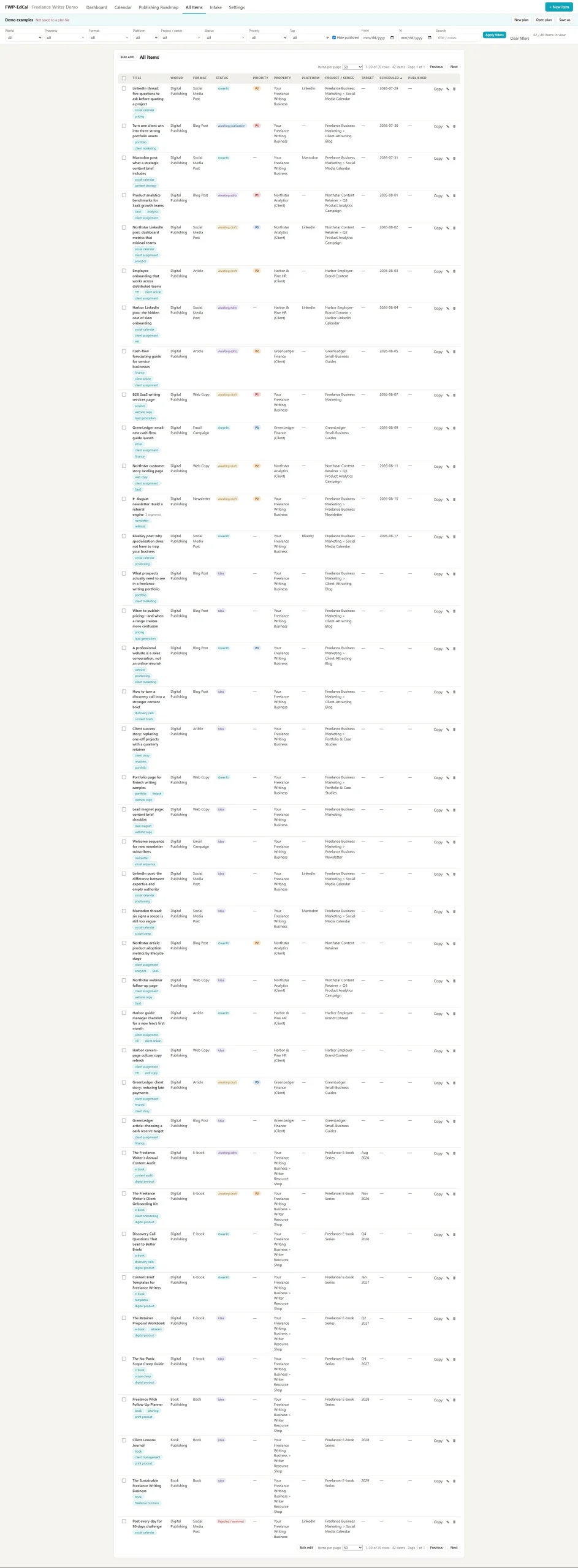
The All Items Screen
This page can look like a bit of a mess, but it’s the main catch-all for everything you’ve entered into this app. It’s main purpose is to be a filterable comprehensive list so you can see all projects, ideas, or whatever else you choose in those filters, in one place.
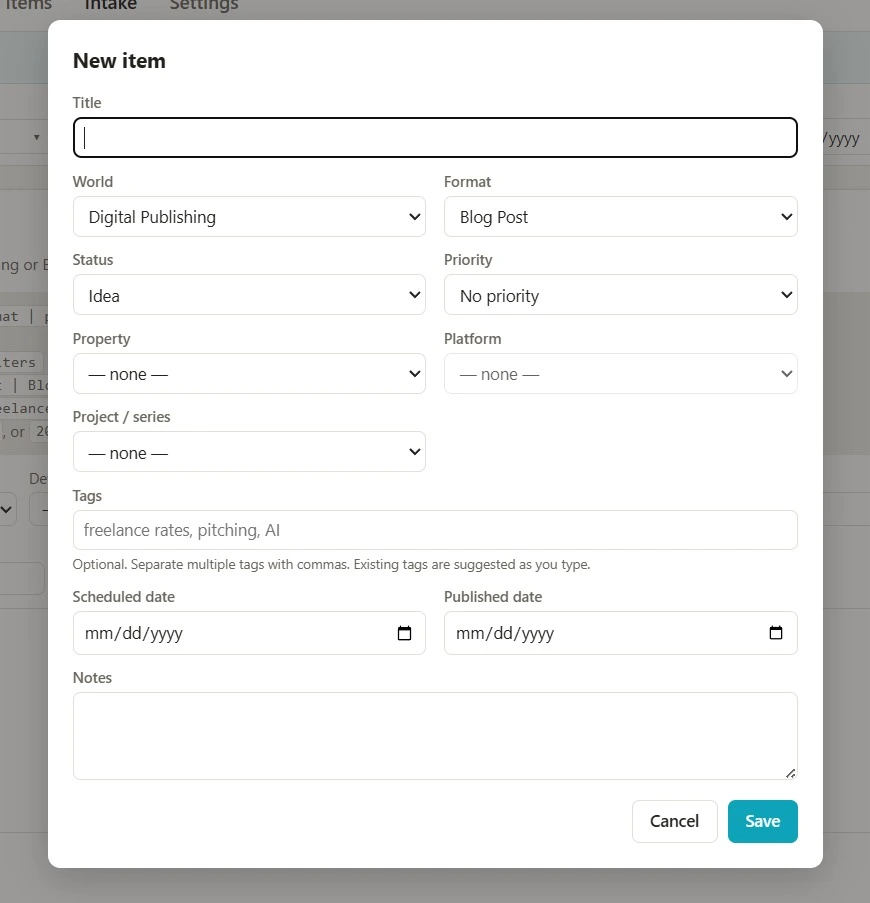
The Add Item Window
When you click the “new item” button, this is what you’ll see. It’s how you can add a single idea, article to schedule, or whatever else you’re working on.
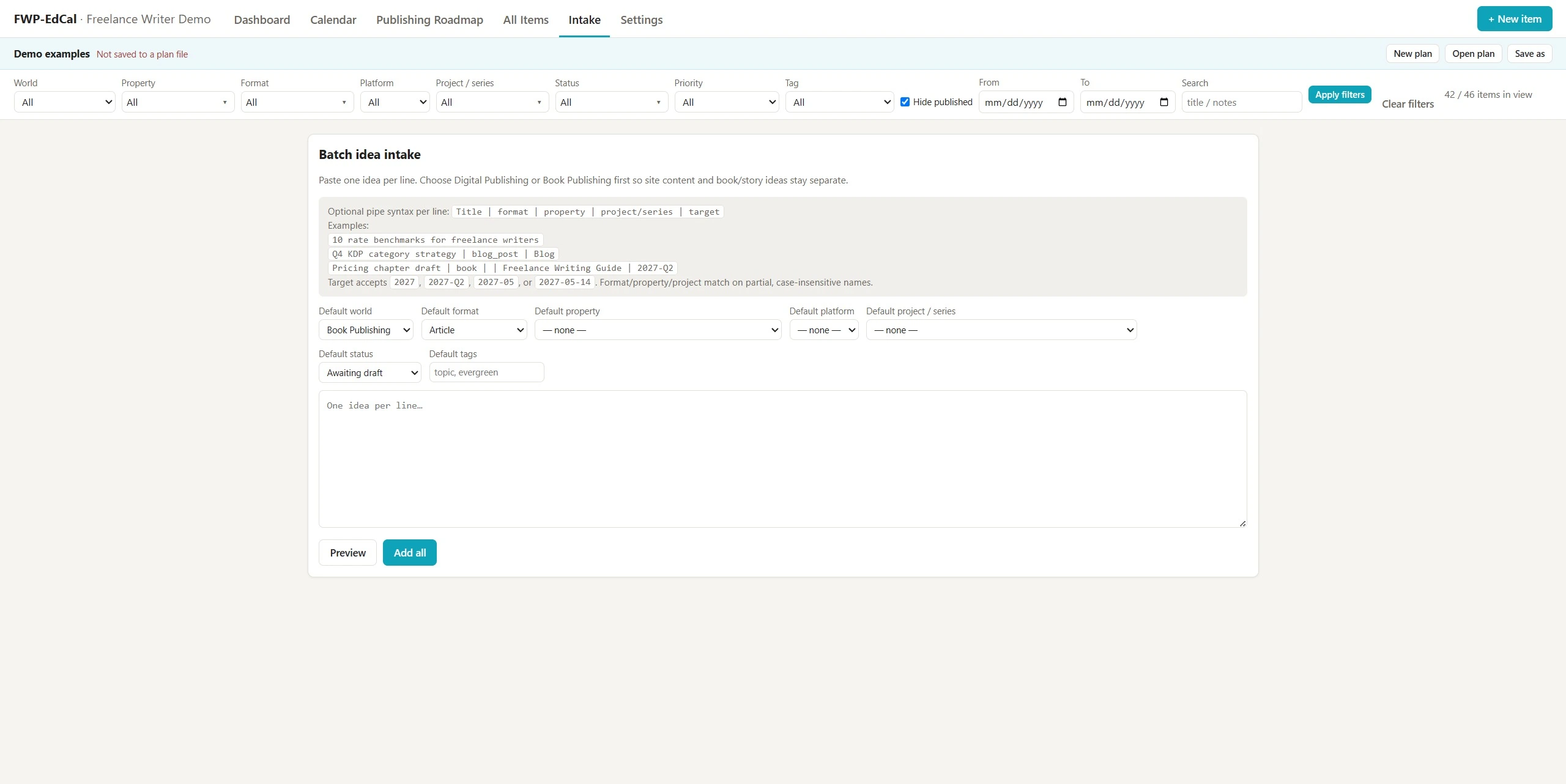
The Bulk Intake Screen
If you already have a list of ideas you want to import, you can do that quicker with this intake page. It’s a good way to group similar items together (like all blog post ideas for a particular site) and get them into the system fast.
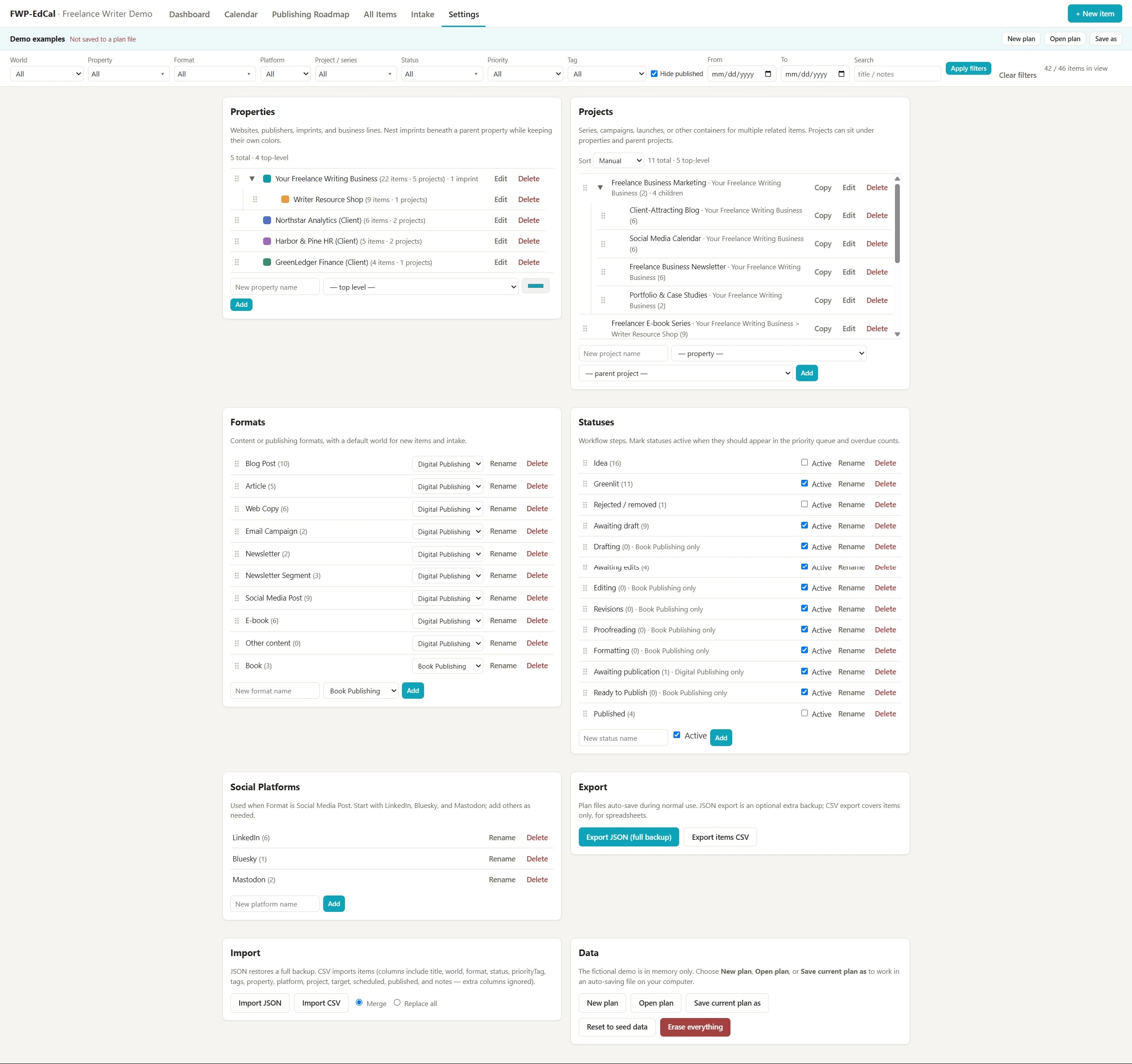
The Settings Screen
This is probably the most important page within the app. This is where you can set up your own properties, projects, statuses, content formats, and social media platforms.
You don’t need to point an AI tool at this to customize it. You can do that within the settings page itself. Add new items. Rename them. Delete defaults you won’t need. This is where you make it work for you.
That’s not to say you can customize everything without a developer or AI tool to help. For example, you’ll see a “world” dropdown at the top left of every page in the filter bar. The built-in ones are Digital Publishing and Book Publishing. That’s primarily what I use this for.
On the freelance side, you might try an AI-driven customization by asking your tool (a desktop tool with folder access like Codex or Claude Cowork) to create a Freelance “world” just for client projects. Personally I add clients to “properties” instead, but if you want to use this more for services, a new “world” might make sense for you. Then you can have the tool include those in either the editorial calendar or long-term roadmap (or both).
Quick note: While I exclusively use desktop AI tools for building any kind of app, given that this is largely a single HTML file, it’s possible you could upload that file to a web AI chat (ChatGPT or Claude.ai for example) and have it deliver an updated HTML file with your requested changes. Haven’t tried it personally.
Some quick things before you download it to play with it if you want to:
- You’ll need to unzip / extract the .zip folder you’ll download below.
- In that extracted folder, you’ll find the readme file, the .html file (literally just an html file that works like a website in your browser, but locally), and an icon that will appear in your browser tab.
- You don’t have to edit the default plan file. You can create a new one to start from scratch, and as many as you want to. They’re all saved locally. This is a one-machine app in its current state. I haven’t yet tested it by saving the folder to a cloud service like Dropbox.
- When working on a plan, changes you make are auto-saved.
- If you want to move a plan to a new system, there’s an import / export option on the settings page.
- The settings page has an option to color-code your properties so all projects or content pieces tied to them are easy to differentiate in broader views.
I know it’s far from perfect. It’s only a few weeks beyond the initial prototype. But this is the most human-driven of the business apps so far in terms of design decisions, improvements, and customizations around a specific business. You’re welcome to work with your preferred tool to tweak a local copy in whatever way suits you.
Want to give it a try or set your own AI tool loose on private customizations just for you? Download it here:
How This Editorial Calendar App Was Built
When it comes to using AI tools to build custom business apps, there is a lot of hype out there. Every time a new frontier model gets released, you’ll see posts and videos all over the place bragging about what someone could “one-shot” with those models.
While those stories can sometimes show interesting use cases, there are problems with them, and I’d suggest not getting too hung up on them or having expectations set too high.
For example, many of these ideas aren’t practical. Certainly not for your business.
They rarely tell you how much token usage was required (do you need a top-level plan or API access to do it or can a consumer with a basic subscription manage it too?).
The “one-shot” prompt they show off is sometimes just linkbait. You don’t know how many iterations they went through before that until they were comfortable replicating it with a new single prompt to get the output they wanted. And if that’s the case, they likely built up a lot of context the AI tool used in that final “one-shot” build.
So I want to be clear about how this particular tool was built:
This wasn’t a case of a single prompt resulting in a usable product. I mean, it was usable, but it needed a lot of refinement that only comes through testing and human decisions regarding usability and usefulness.
I worked through Codex using GPT 5.5 on the initial requirements specs (it already had a lot of context about my business, but I worked out how I needed the tool to operate for certain project types, how it would fit in the break-down of how my work is structured, the kind of interface I was looking for, etc.
I’m not fussed about the look of it too much. The main issues for me were that it needed to work well on my primary system, offer color-coding to help me visually differentiate projects based on properties, have significant customizable filtering options, etc. Other than that, I let Codex run with its own basic look and feel.
After that, there was significant testing and numerous rounds of changes and improvements based on how I found myself wanting to work with it. These changes spread across GPT 5.5 and 5.6 and included:
- Adding nesting to projects
- Creating the local multi-plan auto-save system (initially the prototype saved in a browser session which could be lost on clearing certain browser data if you didn’t export it)
- Adding the weekly and daily views to the editorial calendar page
- Adding all the drag-and-drop functionality throughout
- Including pagination for very long lists
- Adding the bulk edit option and changing how it was displayed (initially Codex had that and filters both visible by default which was confusing)
- Adding the ability to edit, add, and copy projects (and convert them to “items” if you don’t like your initial nested structure)
So understand if you want to build custom business tools, it’s a great use case for AI, but you do need to be the “human in the loop” as they say. The decisions come from you. The usability testing and preferences come from you as well. Expect to work with the tool rather than prompt it once and have it hand you a production-ready app.
Building Your Own Custom Business Tools with AI
If you still think of AI as web-based chat windows and relying on strong prompt engineering, it’s time to catch up. It’s no longer 2023.
These days, for this kind of work, context matters more than your initial prompts.
In web versions, that includes “projects” with source files and their own instructions.
In my case, using desktop tools, I built out a local AIOS (AI operating system) that my desktop tools, including my local LLM, can all pull from so they have the same context, rules, and skills. It’s also accessible to me as an Obsidian vault so I can manually edit any markdown file the tools add. We’ll talk more about how you can do that in a later post.
Ultimately, it’s less about the exact wording of your prompts. You provide as much context as possible up front — your business structure, philosophy, and specific goals. You can even let the tool interview you to build this out.
Then, the tools you use AI to build include that up-front context and can be better built around your unique needs. I know I’m over-simplifying, but essentially: context first, then simply describe your needs to your tool.
Work with it to flesh out the project requirements. Let it plan and propose a way to tackle the project. Then test, test, test. Provide feedback. Ask for changes. And eventually you’ll get a well-fleshed-out app that’s built entirely for you.
Other Custom Business Apps for Inspiration
This is the closest to “finished” custom app I’ve had my AI tools work on so far. But it’s far from the only one. Here are some others in various stages of development and refinement, just to give you some ideas and inspiration for the types of things you can have your AI tools build for you.
- A local browser-based mind-mapping tool similar to one I used to use but that’s only available on mobile (which doesn’t work for me for business use)
- A publishing production planner that lets me plan every stage of a larger publishing project; includes an internal Gantt chart for those; also includes a submission tracker for short fiction and poetry plus a master library of all publishing projects – in the works or published
- Custom editing tool for writing projects (in addition to a traditional editing engine, I can add my own story bibles, property-specific style guidelines, and client briefs to make sure my drafts follow specific rule sets); this one is a desktop app
- An ancestor mapping app (I also run a genealogy site, and a frequent frustration with Ancestry.com is its inability to map or search for ancestors by location); this tool imports a Gedcom (family tree file) and can map them, migration routes of specific lines, and much more; still in an early phase, but already helped me find things I was looking for and couldn’t on the site itself
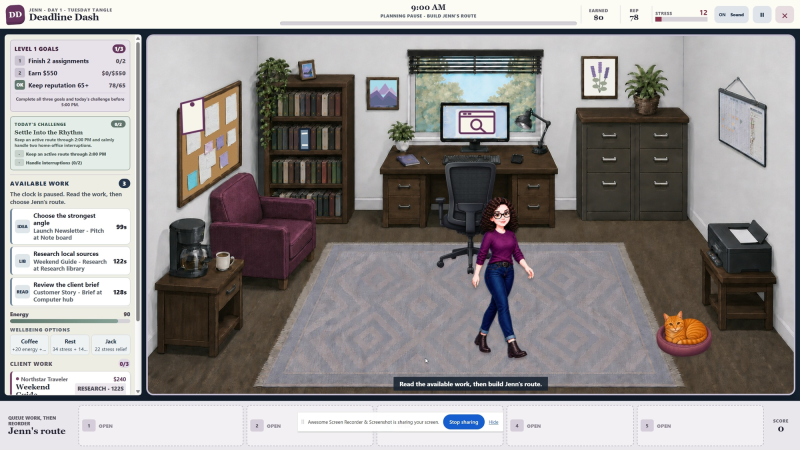
- A freelance-themed time management game which I might be the most excited about. We’ve finally got the prototype fully playable, so the next stage is entirely human-driven (planning out the actual themes, content, projects / tasks to fit each level’s theme or core challenges, planning for future additions to increase the challenge of later levels, etc.); this is something my husband and I considered building years ago and just didn’t have the time, and now I have a private game I can pull out when I need a mental break, yet it still keeps my head focused on writing and freelance work thanks to the theming. There’s even a little cat the character can pet to lower her stress bar. Of course there is.
And this barely touches on what I’ve been able to use AI tools for, especially in the past few months as models have improved dramatically.
Other than app development there’s:
- Vetting and preparing job leads for the All Freelance Writing job board (all human-reviewed/edited/approved)
- Auditing and sourcing new AFW writers’ markets so they can be updated monthly rather than once a year if I was lucky enough to find the time before
- Weekly SEO reports for key sites, combining data from Ahrefs, Google Analytics (GA4), and Google Search Console
- Technical and security audits for my server and sites (came in super handy after the recent WordPress core exploit)
- Fixing an accessibility issue Todoist introduced ages ago that drove me from the app (using it more again thanks to an extension GPT 5.6 built in Codex just this past week)
- Evaluating retired e-books I no longer sell to pull out and organize all evergreen material that can be repurposed on blogs or social media posts so it doesn’t go to waste
- Conducting content audits (work included identifying clean-up candidates, needed mergers, managing redirects, technical audits, etc.); probably the use case that impresses me the most
- And so much more.
Just this year’s work with these ever-improving tools (heck.. just this summer’s work so far) hasn’t just saved me hours. It’s saved me months of time.
Things I expected not to get through for years are finished.
The back-end technical clean-ups of several sites is putting me in a position where I can focus more on writing new posts and improving old ones. A mystery series I shelved ages ago… I’ve finally had time to get back to writing it.
My hands literally ache from all the typing I’ve been doing because of all the new writing time AI tools have freed up for me. Not AI doing that writing. It takes other things off my plate so I can focus more on the parts of my work that I love.
That’s where AI tools really shine. Not cheap generative content that no one wants to read. It’s about giving you the tools you need to do your job more efficiently, while giving you back more time for your writing, and for yourself.
If you’ve built any custom business apps using AI tools, I’d love to hear about them.
